← Back
  1. 01 Overview
  2. 02 Problem
  3. 03 Research
  4. 04 Definition
  5. 05 Exploration
  6. 06 Design
  7. 07 Testing
  8. 08 Current
  9. 09 Reflection

Agora

Making civic participation more accessible, local, and actionable.

Product Design + Frontend Development2026 · Ongoing · Team of 4

Visit the live site ↗ (opens in a new tab)

Tools Figma, React, TypeScript, Python, PostgreSQL, Supabase

01 / Overview

A place to care about where you live, and do something about it.

Agora brings public data on issues across the United States into one place, so people can understand what's happening in their communities and connect with others who care about the same things.

Context
University database systems project, Notre Dame
My role
Product Designer & Frontend Developer
Team
Farah Aburokba, Appo Nikiema, Ray Yang, Zelalem Haile
Timeline
September–December 2026

What people can do

  • 01Building

    Discover issues

    National issues and local ones, side by side. Browse by category, city and state, or search for what you care about.

  • 02Building

    Explore public data

    Real government and open data, from data.gov to state and city portals, sorted by issue and by place.

  • 03Next

    Ask the data

    Ask a question in plain English and get a chart with a short answer. Bring your own dataset, too.

  • 04Next

    Find your people

    Nearby issues and people who care about the same things, on a map. Being visible is opt-in.

02 / Problem

Civic information exists. Meaningful participation is harder.

Problem statement
[To be added] One or two sentences: what makes it hard to go from caring about an issue to acting on it?
Who it's for
[To be added] The people Agora is designed for, e.g. students or residents new to local civic life.
What they need
[To be added] Two or three needs, in their words once interviews are done.
Design opportunity
[To be added] Where Agora can help that existing tools don't.
Initial hypothesis, not yet validated by research
How might we help people discover issues relevant to their communities, understand them through data, and connect with others to take action?

03 / Research

Discovery & research

[To be added] A sentence on how you approached research and what you wanted to learn.

User interviews

Research goals
[To be added] What you set out to learn.
Participants
[To be added] How many people, and who (no names).
Questions
[To be added] Three to five of the questions you asked.
Key findings
[To be added] What you heard most often.
[To be added] A short quote from a participant.
[To be added] Another quote that shows a different need.

Competitive analysis

Competitive analysis: Reddit, Nextdoor, Change.org
RedditNextdoorChange.org
What it does well[To be added] [To be added] [To be added]
Where it falls short[To be added] [To be added] [To be added]
What Agora takes from it[To be added] [To be added] [To be added]

Reddit

What it does well
[To be added]
Where it falls short
[To be added]
What Agora takes from it
[To be added]

Nextdoor

What it does well
[To be added]
Where it falls short
[To be added]
What Agora takes from it
[To be added]

Change.org

What it does well
[To be added]
Where it falls short
[To be added]
What Agora takes from it
[To be added]

Synthesis

  1. 1

    [To be added] Insight one.

  2. 2

    [To be added] Insight two.

  3. 3

    [To be added] Insight three.

Pain points
[To be added] The main pain points, in a sentence or a short list.
Design opportunities
[To be added] The design opportunities they point to.

04 / Definition

One journey, four steps.

Every screen serves one journey: find something that matters where you live, understand it, find the people who care, and do something about it.

1234
  1. Discover

    Find a national or local issue by category, city or keyword.

  2. Understand

    See the issue backed by public data, and ask that data questions.

  3. Find people

    Meet nearby people with shared interests, shown at city level only.

  4. Act

    Endorse, pledge, volunteer or share a resource.

Persona / jobs to be done

[To be added]Primary persona or jobs-to-be-done

User journey map

[To be added]Journey map across the four steps

Information architecture

[To be added]Sitemap: Issues, Near me, Analytics, Profile

Core user flow

[To be added]Flow from an issue to a contribution

05 / Exploration

Sketching the shape of it.

[To be added] A sentence on how the design started: paper, Figma, which screens first.

[To be added]Initial sketches
Initial sketches
[To be added]Low-fidelity wireframes
Low-fidelity wireframes
[To be added]An alternative design direction
Alternative direction

Early design decisions

01People appear at city level only

Problem →
Matching nearby people is useful, but showing where someone is can make them less safe.
Design choice →
Profiles are hidden by default. People who opt in show up at city level, never an exact location.
Reasoning →
[To be added] Why this felt right, e.g. why city rather than neighborhood.
Tradeoff
[To be added] What it costs, e.g. less precise matching in big cities.
02Cards carry one number

Problem →
[To be added] What went wrong when cards showed more?
Design choice →
An issue card shows a title, a place, a category and one number: its supporters.
Reasoning →
[To be added] Why one number.
Tradeoff
[To be added] What people can't see at a glance any more.

03[To be added] A third decision

Problem →
[To be added] Problem
Design choice →
[To be added] Design choice
Reasoning →
[To be added] Reasoning
Tradeoff
[To be added] Tradeoff

06 / Design

Designing Agora

A

Discovering issues

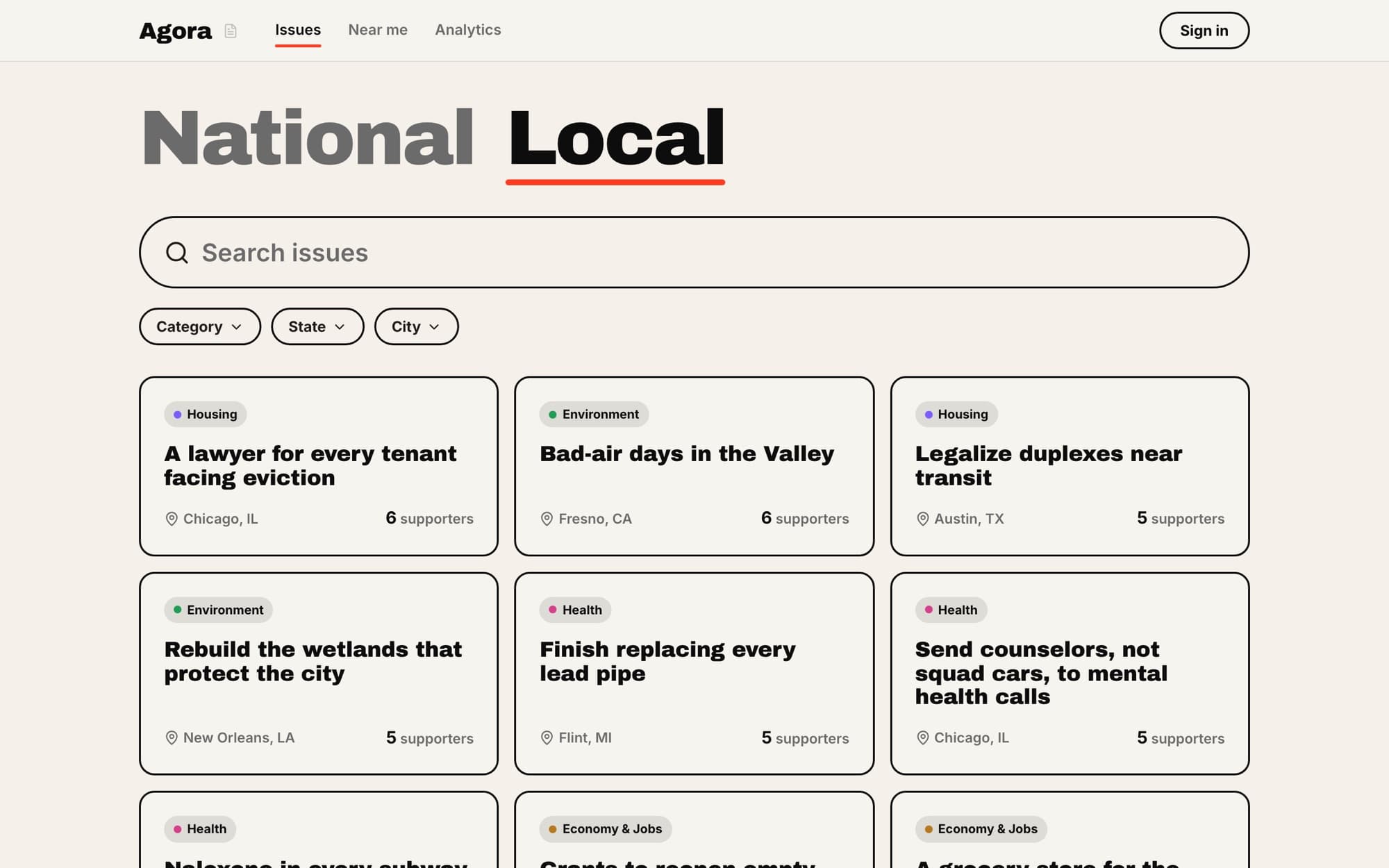
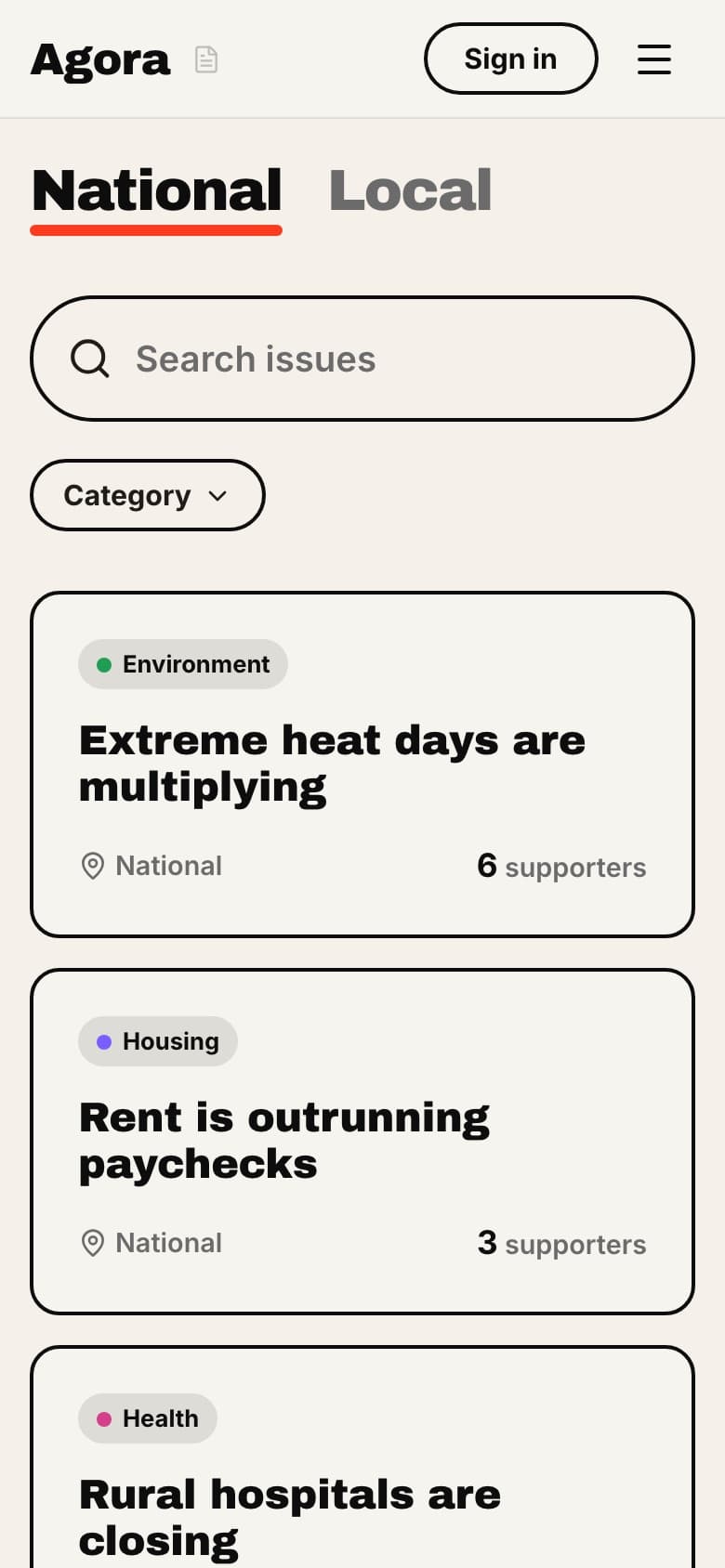
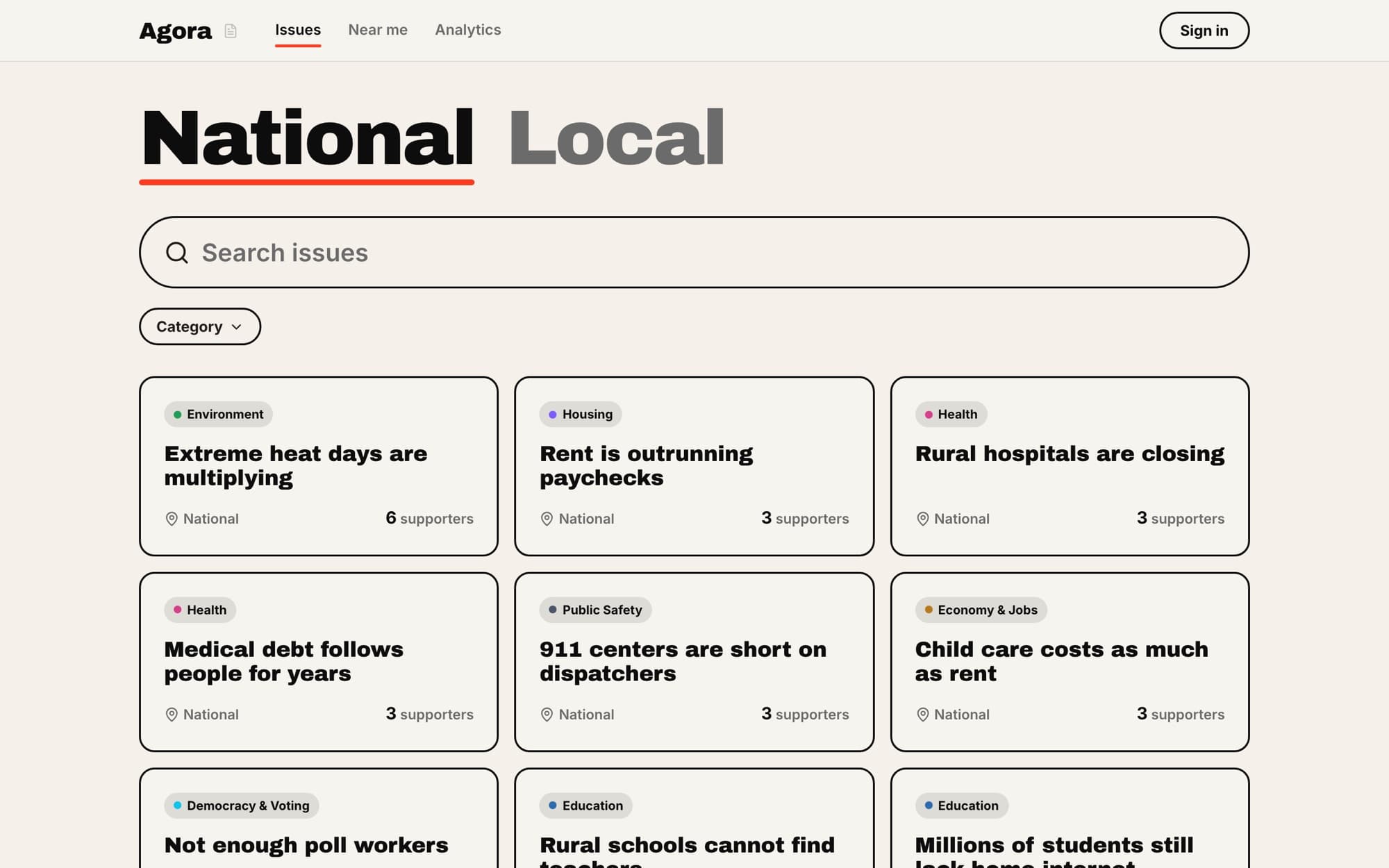
Make a long list of national and local issues easy to scan, not overwhelming.

Agora's Issues page: National and Local tabs, a search bar and issue cards
Issues, National tab. Current build.

Design decisions

  • National and Local are two huge tabs, not a filter buried in a menu.
  • State and City filters appear only on Local, where they mean something.
  • Each card: a category tag, a title, a place and a supporter count. Nothing else.

Interaction details

The tab underline slides between National and Local; cards lift on hover.

Iterations

[To be added] How the issue list changed between versions.

The Local tab, with State and City filters next to Category
The Local tab adds State and City filters.
B

Local matching

Show who nearby cares about the same things, without exposing where anyone is.

[To be added]Near me: a map of the U.S. with nearby issues and opted-in people by city
Near me (screenshot to come)

Design decisions

  • Matches are ranked by shared interests, distance and activity.
  • Visibility is opt-in and off by default.
  • People are placed by city, never by exact location.

Interaction details

[To be added] How the map behaves: zoom, hover, what a tap on a city shows.

Iterations

[To be added] How matching changed between versions.

C

Data analytics

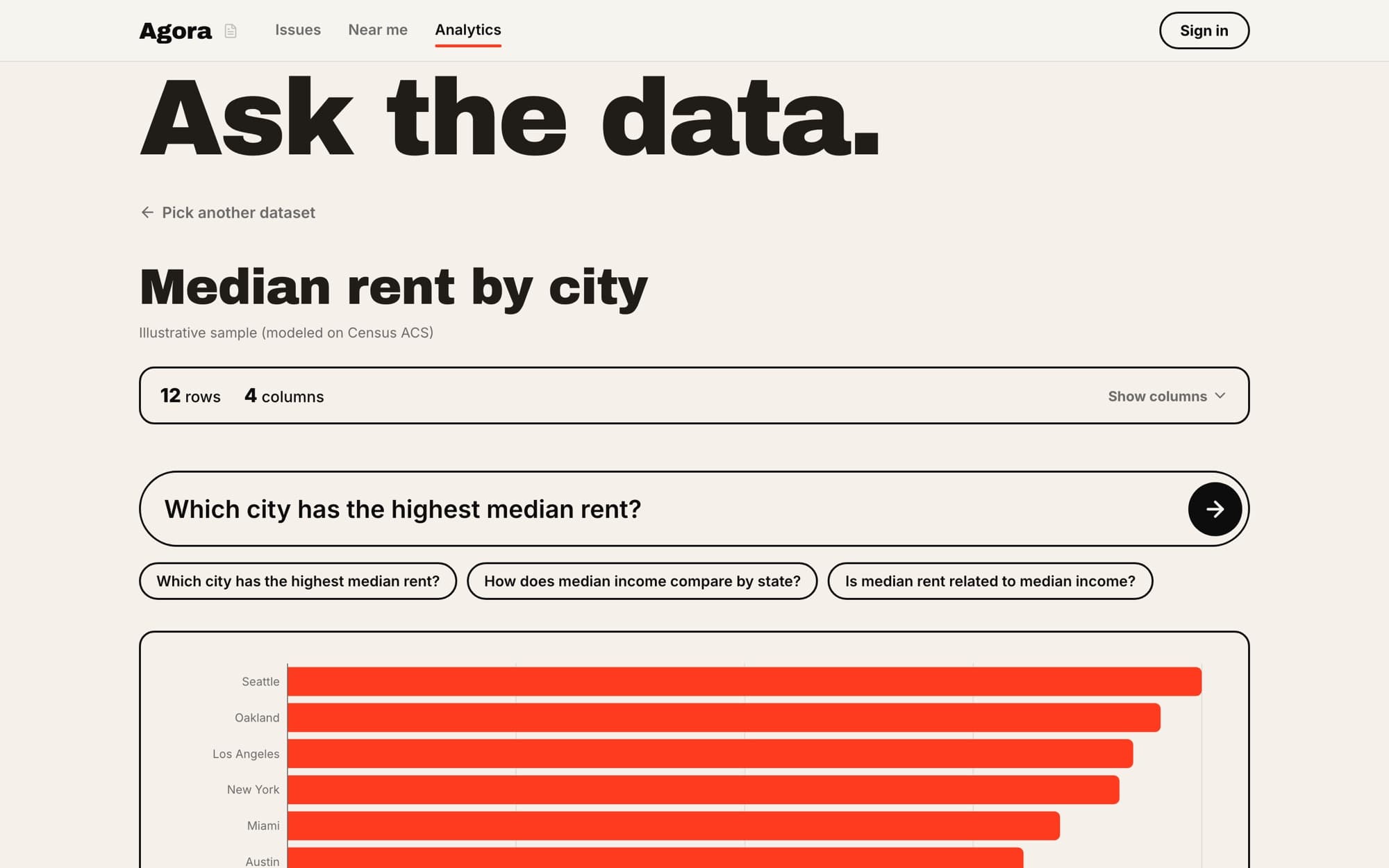
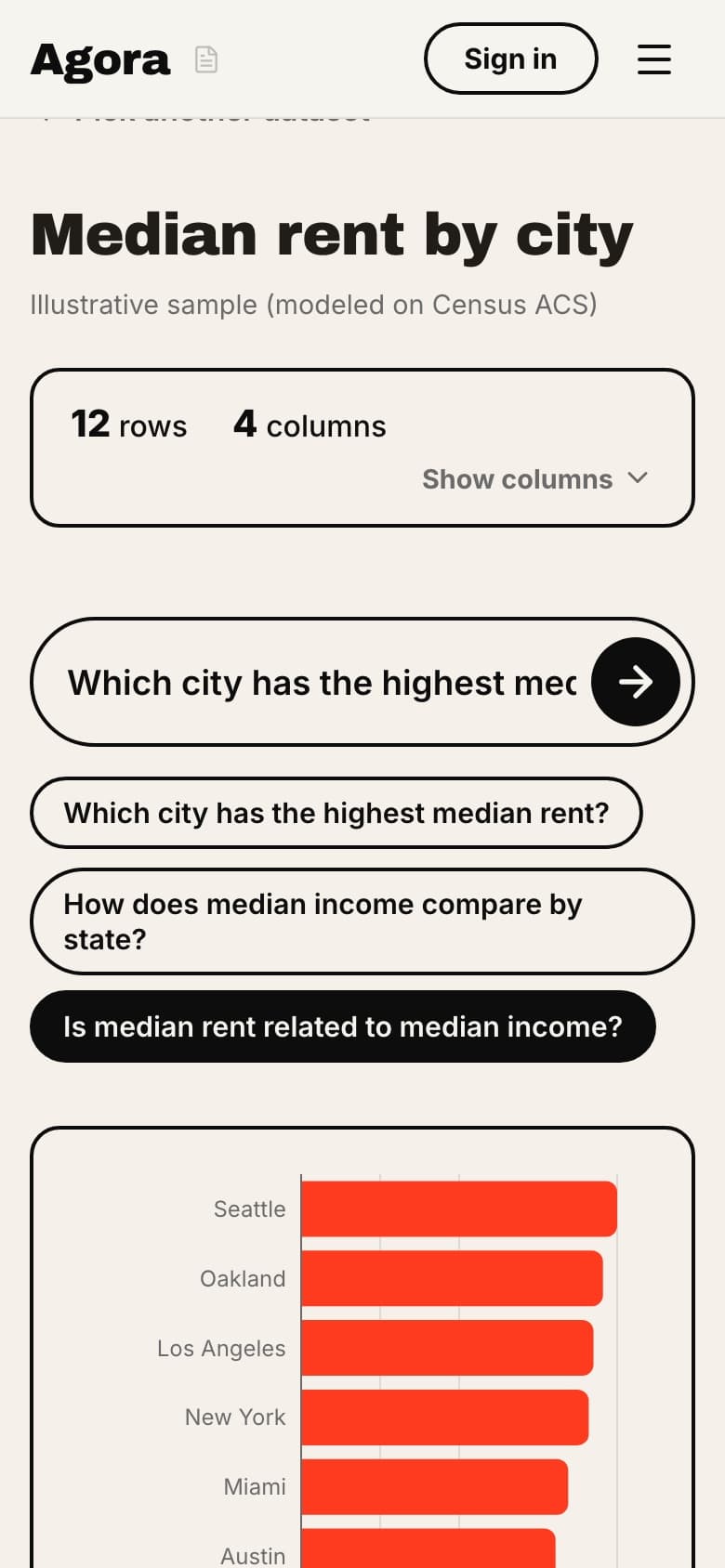
Let someone with no statistics background ask a real question of a public dataset.

Ask the data: a question about median rent answered with a bar chart of cities
A plain-language question, answered with a chart. Current build.

Design decisions

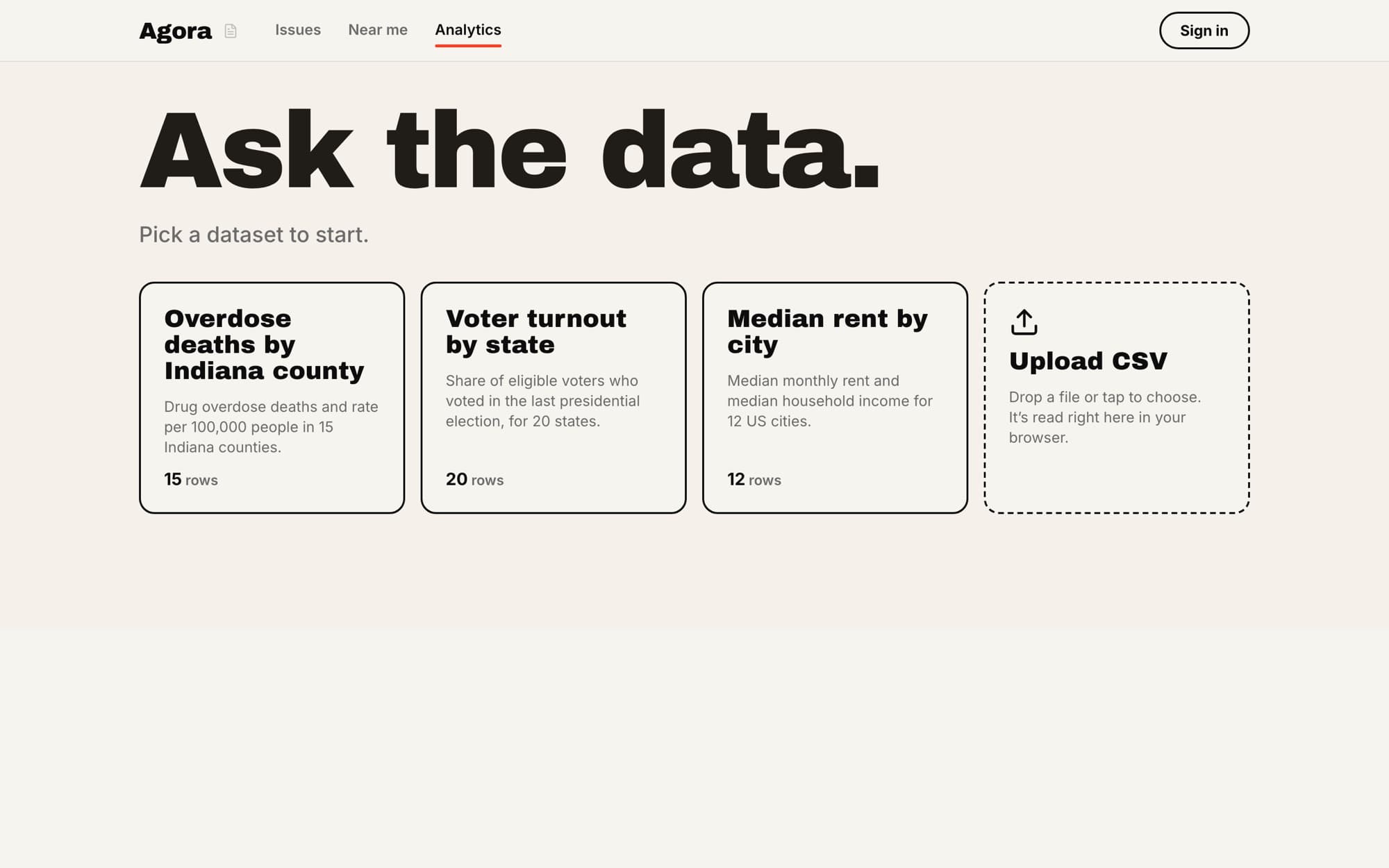
  • Start from a dataset, not a blank box: three samples, or your own CSV.
  • Show a short profile of the data (rows, columns) before asking anything.
  • Suggested questions show what's possible, so the first question is one tap.

Interaction details

An uploaded CSV is read right in the browser; the answer is a chart plus one short paragraph.

Iterations

[To be added] What changed in how questions and answers are shown.

Picking a dataset: three samples and an Upload CSV card
Start from a sample dataset, or upload a CSV.
D

Community participation

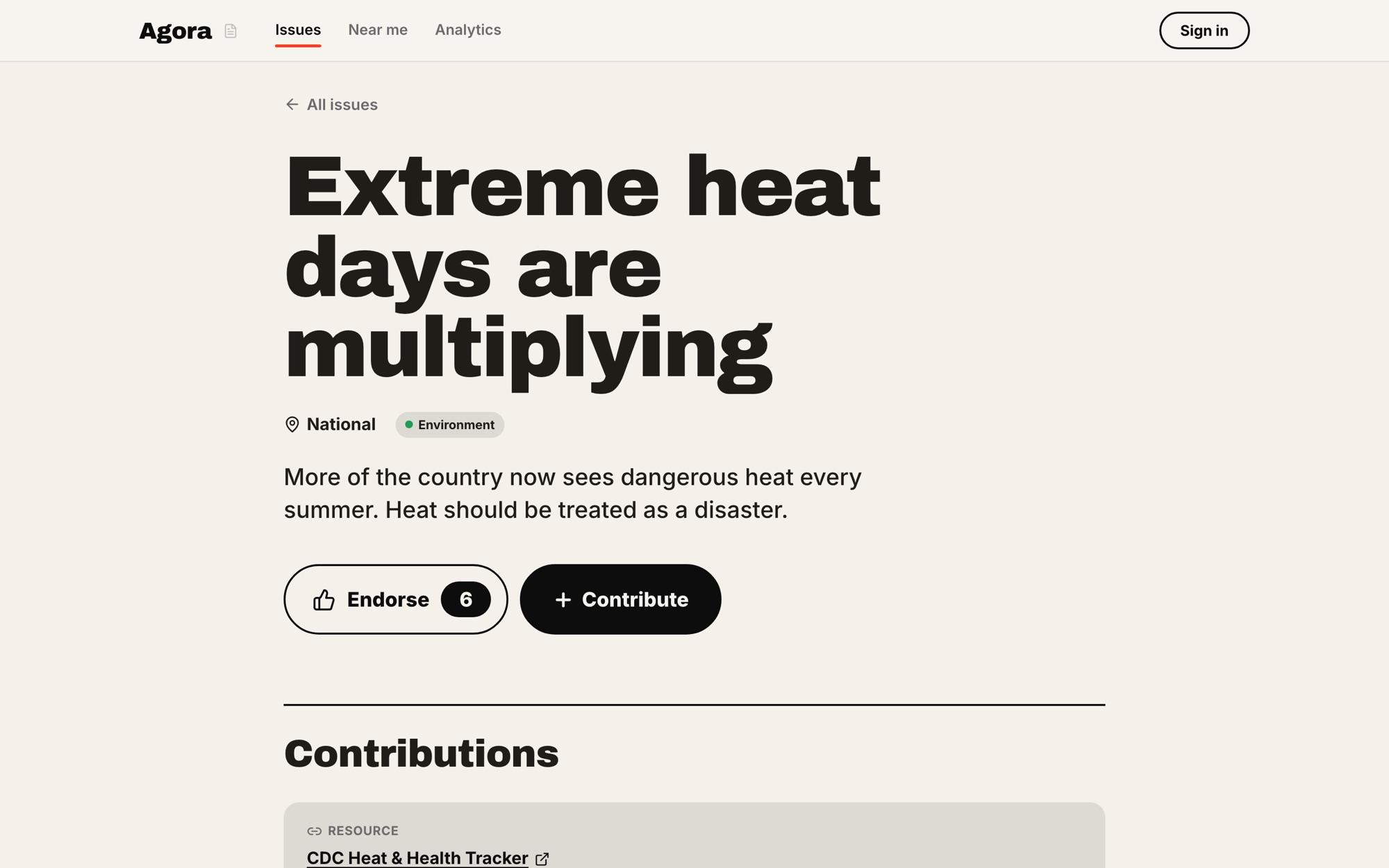
Turn caring about an issue into a small, concrete action.

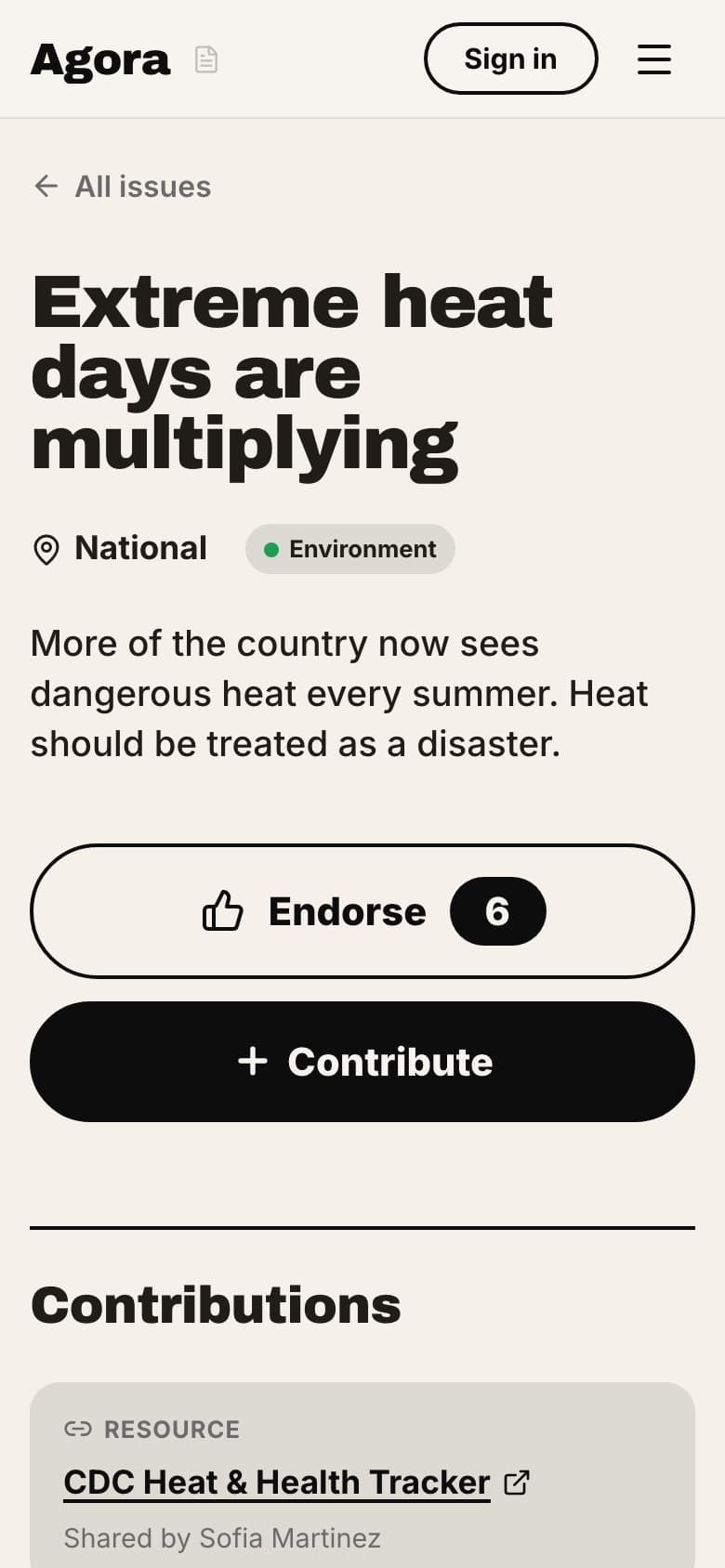
An issue page: title, place, category, Endorse with a count, Contribute, and the contributions list
An issue, with Endorse and Contribute. Current build.

Design decisions

  • Four ways to contribute: a pledge, volunteering, a resource link, or a one-tap endorse.
  • Endorse is a toggle with its count beside it, so support shows right away.
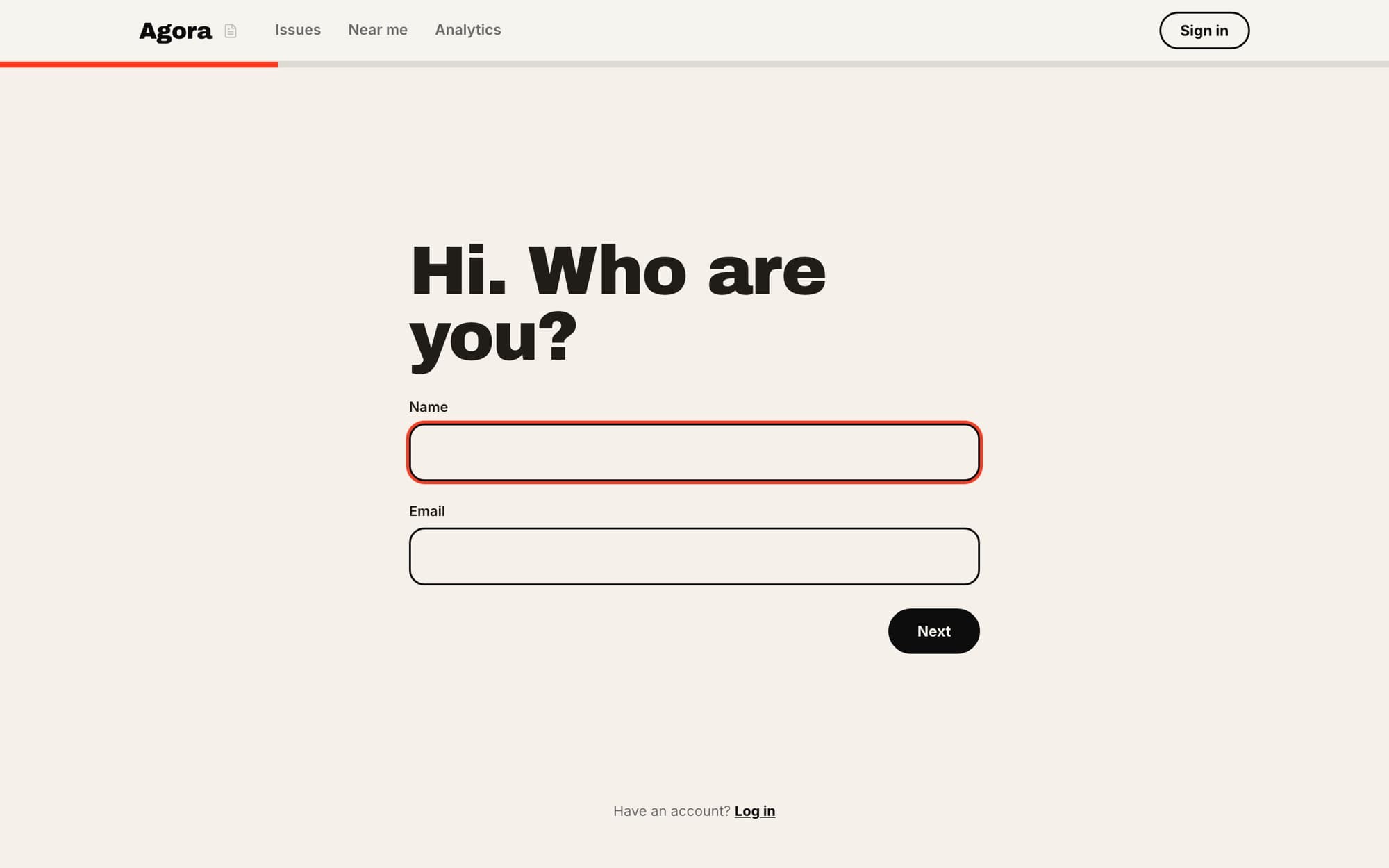
  • Sign-up goes one short step at a time, with a progress bar along the top.

Interaction details

[To be added] Comments: how replies and editing your own posts work.

Iterations

[To be added] How contributions and comments changed between versions.

Sign up, first step: “Hi. Who are you?” with name and email fields
Sign-up, one short step at a time.

07 / Testing

Testing & iteration

Testing planned. Nothing below has been run yet.

Objectives
[To be added] What the test should tell you.
Participants
[To be added] Who, and how many.
Tasks
[To be added] e.g. Find a local issue in your city and endorse it.
Observations
[To be added] What you saw people do.
Changes made
[To be added] What you changed because of it.

Before & after

[To be added] Which screen changed most after testing, in one line.

[To be added]Before testing
Before
[To be added]After testing
After
[To be added]Iteration 1
Iteration 1

[To be added] What changed and why.

[To be added]Iteration 2
Iteration 2

[To be added] What changed and why.

[To be added]Iteration 3
Iteration 3

[To be added] What changed and why.

08 / Current

Current Experience

Agora is still being built. These are screens from the current build.

Open the live app ↗ (opens in a new tab)
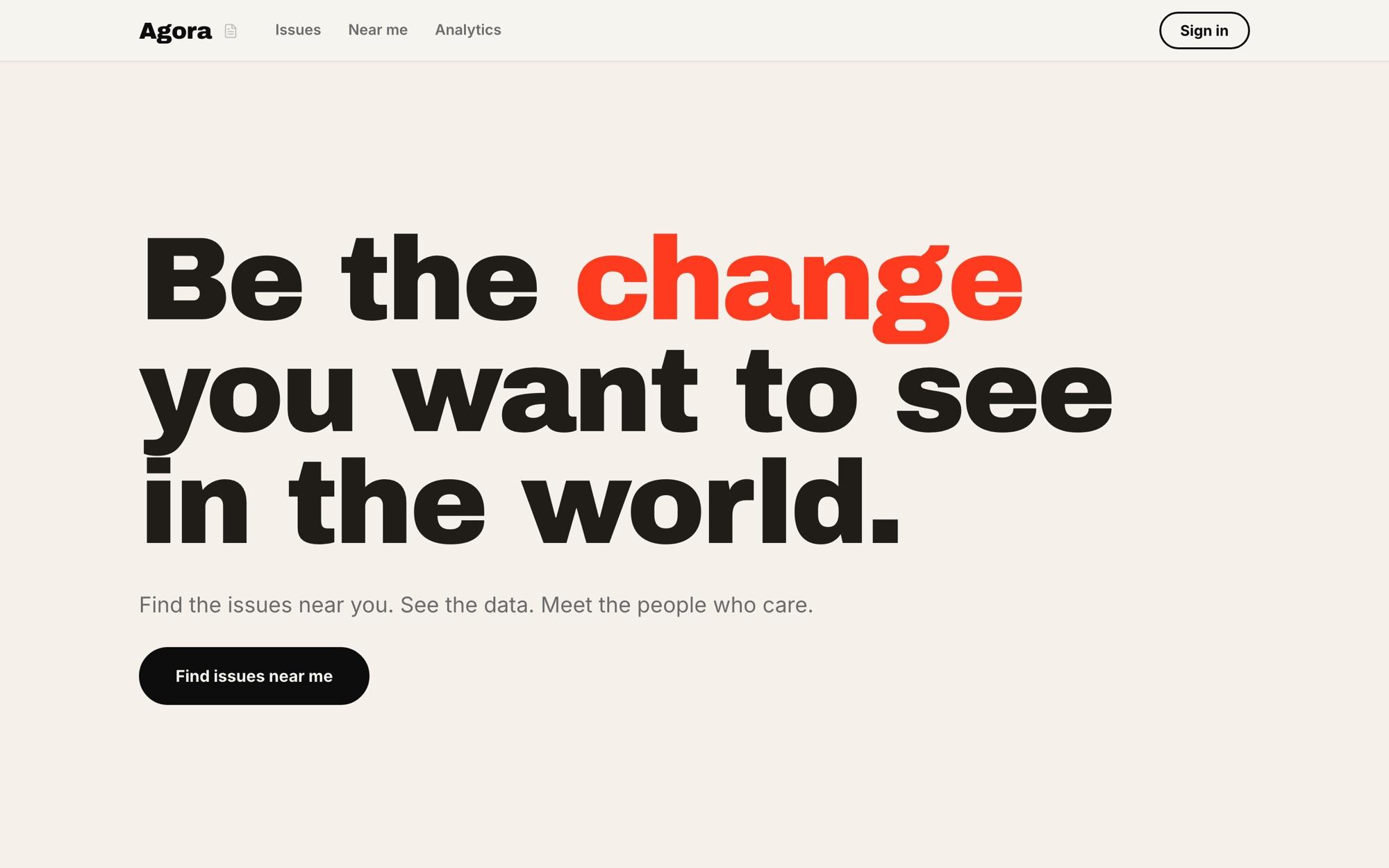
Agora's home page: “Be the change you want to see in the world.”
Desktop
Issues on a phone
Issues
An issue on a phone
An issue
Ask the data on a phone
Ask the data

Main user journey

[To be added]The main journey, screen by screen: discover, understand, find people, act

Interactive prototype

[To be added]A Figma prototype or a short demo video

Where the build is

  1. Postgres on Supabase, the relational schema, and wireframes for every page.

  2. 10,000+ rows of public data, plus issues, comments and contributions people can post.

  3. Find issues by category, city and state, with search across joined tables.

  4. Nearby issues and people, ranked by shared interests, distance and activity, on a map.

  5. Plain-language questions answered with charts, and the site opens to real users.

  1. Foundation

    done

    Postgres on Supabase, the relational schema, and wireframes for every page.

  2. Real data & community

    in progress

    10,000+ rows of public data, plus issues, comments and contributions people can post.

  3. Search & discovery

    coming up

    Find issues by category, city and state, with search across joined tables.

  4. Local matching

    coming up

    Nearby issues and people, ranked by shared interests, distance and activity, on a map.

  5. Data engine & launch

    coming up

    Plain-language questions answered with charts, and the site opens to real users.

09 / Reflection

Outcomes & reflection

User feedback
[To be added] What people said once they used it.
Usability results
[To be added] What testing showed.
What improved
[To be added] What got better between versions.
Constraints
[To be added] Technical and design constraints, e.g. designing the UI against mock data before the backend existed.
What I learned
[To be added] Two or three honest lessons.
What I'd do differently
[To be added] One thing you'd change.
Next steps
[To be added] What comes after this semester.
← Back to all projects